Security & Trust
ostk layers policy, process isolation, local audit, and identity evidence around operations routed through the kernel. Coverage depends on the integration: native client tools bypass the kernel, audit signing requires a key, and process identity is stronger than a self-asserted client name.
Defense-in-Depth Model
Security in ostk does not rely on one boundary. Four containment and audit layers apply where the selected platform and client route an operation through the kernel:
Identity-Derived Trust Tiers
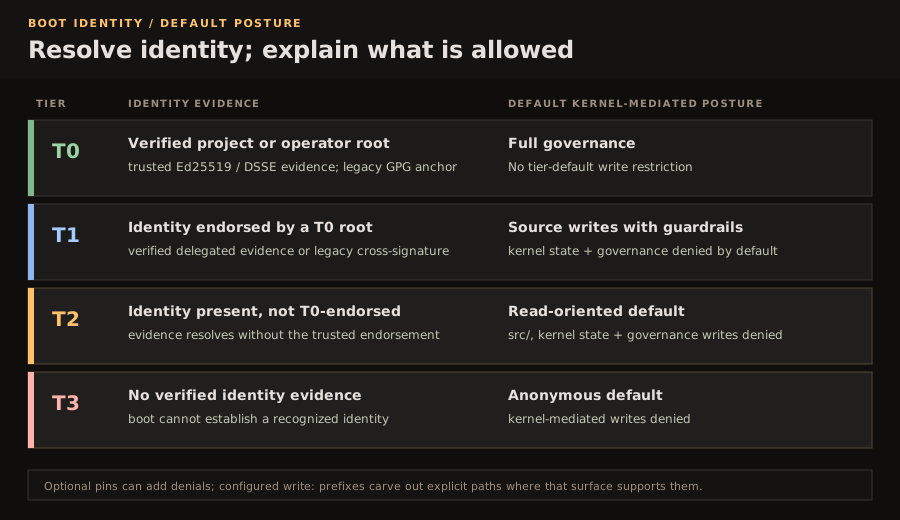
At boot, ostk resolves SIGN evidence from the HUMANFILE together with verified primefile identity evidence, then uses legacy GPG resolution as a fallback. The resulting T0–T3 tier supplies the default posture for kernel-mediated operations:
How Identity Is Admitted
A new project can establish a verified local root through the self-sovereign primefile created by ostk init. Current identity evidence uses Ed25519/DSSE-compatible verification where available; existing environments can retain the legacy GPG fallback.
On the legacy GPG fallback, a verified T0 cross-signature yields T1 and an unendorsed key yields T2. T3 applies only when no verified primefile or other recognized identity evidence resolves. Revocation remains a policy state for historical verification; the boot resolver itself reports T0–T3.
Capability Pins & Profiles
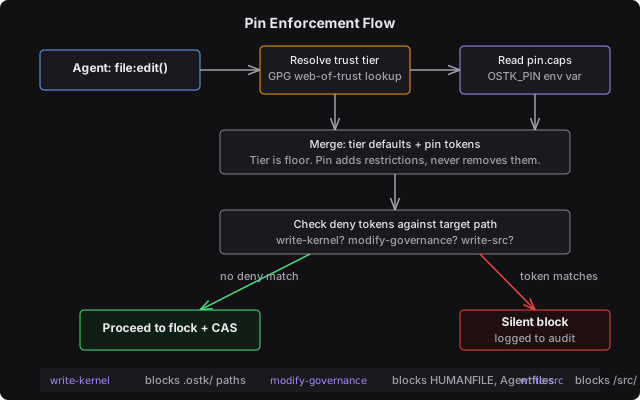
Trust tiers provide the default posture, while an operator-authored pin profile can add deny tokens and verb rules or declare narrow write: prefixes as explicit path carve-outs. Enforcement depends on the execution surface; for fs_ops, an active pin that cannot be read makes writes fail closed.
Bounding a Worker Profile
Create custom profiles inside .ostk/pins/<name>/pin.caps and activate them via the OSTK_PIN environment variable:
$ ostk issue_pin fix-bug
pin fix-bug issued
  .ostk/pins/fix-bug/pin.boot
  .ostk/pins/fix-bug/pin.caps

$ cat .ostk/pins/fix-bug/pin.caps
read: .ostk/ .language
write: .ostk/store/fix-bug/
execute: shell(readonly)
deny: write-kernel modify-governance

# Activate this profile for a supported launch path
$ OSTK_PIN=fix-bug ostk run .ostk/agents/fix-bug.af
Empirical Bounding with ostk learn
If you do not know what paths your worker needs, run it in observation mode to extract the minimal required permissions automatically:
$ ostk learn .ostk/agents/fix-bug.af --duration 120
LIMIT read-path src/ tests/ Cargo.toml
LIMIT write-path src/ tests/ target/
LIMIT verb cargo build cargo test

# Automatically apply the suggested LIMITs back into the Agentfile
$ ostk learn .ostk/agents/fix-bug.af --apply
The Seven-Step Approval Chain
The embedded CPU agent loop uses this ordered approval chain for its tool calls, from pin caps to any required operator approval. It is not the universal dispatch path for every System ABI verb, and native client tools do not enter it. First matching rule wins within that loop:
PIN_CAPS_HARD_DENY
Checks write capabilities against pin.caps. If matching write-kernel, modify-governance, or write-src, it is denied immediately. Fails closed.
DESTRUCTIVE_CHECK
Runs destructor checks on command strings. Dangerous commands (e.g. rm -rf) or active danger signals override all auto-approval paths and force a prompt.
KERNEL_READ_AUTO
If the command is exactly a read-only kernel inspect primitive (e.g. ostk ps, ostk clock, ostk show), it is automatically approved without prompts.
PERMISSION_MODE_GATE
Checks the active permission mode. Autonomous allows all; Auto allows standard reads plus ordinary edit/write classes; Governed and Plan deny write classes by default.
SESSION_ALLOW_LIST
Checks transient in-memory approved verbs. If the operator approved a tool class with the "approve all" key, it is auto-approved until the session ends.
AGENTFILE_TOOL_PATTERNS
Compares the call target against Agentfile TOOL directives. Substring matches approve specific file paths or command classes.
USER_PROMPT
Falls back to prompting the human operator. Keybindings: y=approve, n=deny, a=approve class, Enter=deny (safety default).
Secrets Management & Masking
When a supported tool resolves credentials through ostk, the kernel avoids placing the value in the model prompt, resolves it at execution time, and injects it only into the active subprocess environment. Native shells and external services remain separate boundaries:
Interactive Secrets Administration
# Securely write a secret to the keychain
$ ostk secret set ANTHROPIC_API_KEY
Enter value: ●●●●●●●●
✓ stored in macOS Keychain (service: ostk, account: ANTHROPIC_API_KEY)

# List stored secrets
$ ostk secret list
ANTHROPIC_API_KEY    ✓ keychain
GEMINI_API_KEY       ✓ keychain
OPENROUTER_API_KEY   ✗ not found
Output Masking
Kernel-mediated results on supported masking paths pass known values through secrets::mask() before they are returned to the model. This does not sanitize output produced through native client tools or unrelated external processes.
Any string matching a known API key structure with length ≥ 8 characters is automatically replaced with ●●●● (length).
Verifiable Audit Chains
Kernel-mediated dispatches append entries to the local journal (.ostk/journal.jsonl). Native client actions that bypass ostk are not covered. Appended rows are:
- Hash-chained: Contains the SHA-256 hash of the preceding line (
prev_hash). - Conditionally signed: Ed25519-signed in process when the kernel signing key is available; otherwise
sigis empty. - Verifiable within scope: The hash chain and present signatures can be checked. Replay rebuilds supported registries and projections, not every byte of runtime history.
# Cryptographically audit the local journal
$ ostk audit check
audit: 18,442 rows, hash chain ok, present signatures verified, unsigned rows reported

# Inspect the running log
$ tail -f .ostk/journal.jsonl
{"event":"tool.fs_ops","path":"src/lib.rs","gen_before":4,"gen_after":5,"writer":"claude-code-1","ts":"2026-05-22T21:42:11Z","prev_hash":"...","sig":"..."}
{"event":"tool.bash","cmd":"cargo test","exit_code":0,"duration_ms":1842,...}
fs_ops CAS edits provide expected text and use generation history to detect stale or overlapping work. Safe non-overlapping changes may auto-merge; ambiguous changes fail visibly. Native client writes, raw shell writes, and overwrite-style operations do not inherit this OCC guarantee.
Signed Portable State (Bail)
A bail is a signed, compressed archive (.bail) whose contents depend on the selected public, full, or export mode. It can transfer the state explicitly included in that package between instances; it is not a blanket export of external harness sessions, runtime-only state, or every derived index.
Contains public bootstrap states (.boot/INIT, .primefile, ENTITYFILE). Signed with Ed25519. Safe to share publicly.
Adds encrypted internal kernel database (os.bin). Requires recipient key declarations. Unpack is strictly fail-closed on signature mismatches.
Selective export of needles, decisions, and markdown docs. Recipient merges items labeled with [I] import markers. GPG-signed.
Bail Administration Commands
ostk bail pack Pack full encrypted bundle. Defaults to public mode if no recipient key is configured. ostk bail pack --public Pack public bootstrap files (.boot/INIT, .primefile, ENTITYFILE). ostk bail pack --export @identity Export selective needles, decisions, and docs matching a query. ostk bail verify <file> Cryptographically verify all detached signatures inside the bail without unpacking. ostk bail unpack <file> Verify and merge the bail contents into the local .ostk/ directory. # Verify a bail package received from another machine $ ostk bail verify project-export.bail ostk bail verify: /tmp/project-export.bail Ed25519: VERIFIED (inline) GPG: no manifest.json.asc in bail created: 2026-05-22T14:23:10Z files: 5
Key Rotation & Revocation
If a private key is compromised, it must be revoked without invalidating historical signatures. Revocation uses the following workflow:
# Record a key revocation
$ ostk trust revoke 7141A45868F8295E5BEB6286BAF08C963C7E3184 --reason "leak"
✓ Revocation registered

# Generate a new key and request cross-signing
$ gpg --full-generate-key
$ ostk trust sign <new-fingerprint>